WordPress to HighLevel: DIY Integration vs. Done-for-You Setup
A practical comparison of native WordPress plugins, Zapier or Make, and a professionally implemented lead sync — so website enquiries reach the right place in HighLevel.
Your website enquiries should not sit in an inbox waiting to be copied.
If you are copying website inquiries from WordPress into GoHighLevel by hand, you are paying a hidden tax every day: slower follow-up, lost context, duplicate contacts, and the nagging feeling that your CRM is always behind reality.
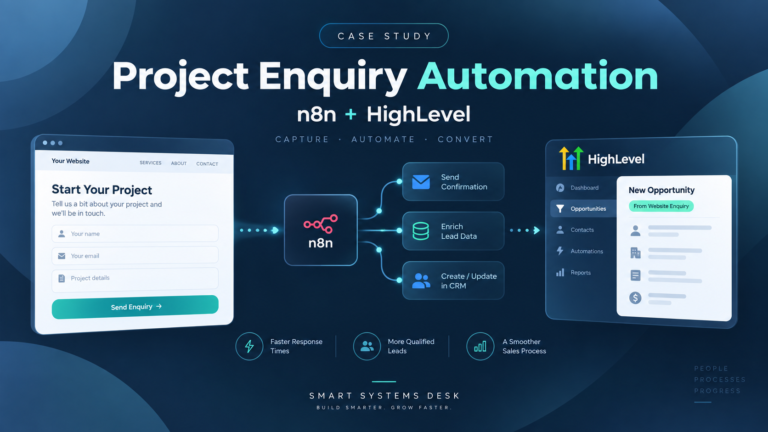
The fix is simple in concept: your WordPress forms should create or update the contact in HighLevel automatically, and ideally create an opportunity too.
Where it gets messy is execution. Search results for GoHighLevel integration with WordPress mix together different needs. Choosing the wrong route can leave you with a half-working connection that quietly costs you leads.
Are you trying to host WordPress on HighLevel, or sync leads into HighLevel?
This confusion wastes more time than any plugin choice.
HighLevel WordPress hosting concerns where your website lives. Hosting does not automatically solve CRM lead synchronization.
WordPress-to-HighLevel lead syncing concerns data movement. Someone submits a form and HighLevel receives the contact information, source, tags and potentially an opportunity.
If leads are arriving by email but not reliably appearing in HighLevel, it is the second problem you need to solve.
A CRM workflow can only be as reliable as the information entering it. If lead intake is inconsistent, every follow-up automation becomes less dependable.
What an automatic WordPress-to-HighLevel lead sync should do
Before choosing tools, define the outcome. A useful lead sync should cover the following:
Create or update the contact
Avoid duplicate records when the same person submits more than once.
Capture the source
Record the form, page and relevant campaign information.
Apply the right tags
Give HighLevel automations the information needed to route each enquiry.
Create an opportunity
Place qualified enquiries into the correct pipeline and stage.
Trigger an appropriate response
Send a relevant email or SMS based on the enquiry rather than a generic message.
If duplicate handling and pipeline opportunities are ignored, the integration may create extra cleanup work later.
There is no single right tool for every WordPress-to-HighLevel integration.
Native WordPress plugin
Suitable for straightforward forms and basic contact creation.
Zapier or Make
Useful for conditional routing, field mapping and multi-step workflows.
Done-for-you implementation
A managed solution for businesses that want the integration built, tested and handed over.
Native WordPress plugins: fastest to try, easiest to outgrow
Many businesses start with a WordPress plugin that connects form submissions to HighLevel. Sometimes that is enough.
When a plugin is a good fit
- You have one or two simple forms.
- You mainly need contact creation.
- You do not require complicated routing.
- You can troubleshoot occasional integration problems.
- Duplicate contacts instead of updates.
- Missing hidden fields or campaign data.
- Problems after plugin or theme updates.
- Contacts created without pipeline opportunities.
Test every form, submit the same email address twice, and verify where the information arrives in HighLevel.
Zapier or Make: more control, more moving parts
Zapier and Make can receive form submissions through supported integrations or webhooks, transform the data and pass it to HighLevel.
This route makes sense when you need to:
- Route enquiries based on the service selected.
- Create opportunities in specific pipelines.
- Apply tags and assign contact owners.
- Trigger follow-up workflows.
- Store campaign and source information.
A connection is not finished just because the first test succeeds. Field mapping, duplicate handling and failed executions need attention if the workflow is going to support real business enquiries.
When it makes more sense to pay for implementation
If you run a small business, your scarcest resource may not be software. It may be the time needed to keep everything working.
A DIY integration still needs someone to:
- Test the process thoroughly.
- Document the configuration.
- Monitor failures.
- Maintain field mappings.
- Update the integration when business processes change.
If you would rather spend that time running your business, professional implementation can be a practical alternative.
Smart Systems Desk builds connected workflows for solopreneurs and small teams who want to reduce manual administration and connect their existing tools.
We start by understanding where enquiries, customer information or follow-up tasks are getting stuck. From there, we define the integration, agree on the scope and implement the solution.
Which option should you choose?
Choose a plugin if your form setup is simple and you can handle occasional troubleshooting.
Choose Zapier or Make if you need more logic and are comfortable maintaining the automation.
Choose done-for-you if reliable lead intake matters to your business and you prefer professional implementation.
The important part is not which tool sounds most impressive. It is whether the complete process works reliably for your business.
WordPress to HighLevel lead syncing: FAQs
Will this create contacts and opportunities automatically?
Yes, when configured to do so. The integration can create or update contacts and place opportunities in the appropriate pipeline.
Do I need to move my WordPress site to HighLevel hosting?
No. Hosting and CRM integration are separate services. You can keep your existing WordPress hosting.
What is the biggest risk with DIY integrations?
Silent failures. Changes to forms, fields or integrations can interrupt data synchronization without an obvious warning.
Can I keep my current WordPress form plugin?
Often, yes. Compatibility depends on whether the form plugin can transmit submission data through a supported integration, webhook or API.
Get your WordPress enquiries flowing into HighLevel.
Smart Systems Desk helps businesses connect WordPress forms, HighLevel contacts, pipelines and follow-up workflows.
If you would rather have the integration implemented for you, tell us about your current setup and what needs to happen automatically.