Automating Project Inquiries with n8n and HighLevel
How a website project inquiry was turned into a structured CRM workflow that automatically captures contact details, stores project information and creates an opportunity in the correct sales pipeline.
From website form to structured CRM workflow.
A project inquiry contains valuable information: who the potential client is, how their business currently works, where the process is getting stuck and what they would like to improve.
That information should not have to be copied manually from a website form into a CRM before the inquiry can be followed up.
Smart Systems Desk needed a workflow that could move this information automatically from the website into HighLevel while keeping the intake process simple for the person submitting the form.
A useful inquiry should not create more manual work.
The project inquiry form asks for more than a name and email address. It also collects information about the organization, the current workflow, the tools being used, the bottleneck and the improvement the person is looking for.
Without an integration, that information would need to be reviewed and transferred manually into the CRM.
That creates unnecessary administration and increases the risk that useful context is lost between the initial inquiry and the follow-up.
Website inquiries contained the right information, but that data needed a reliable route into the CRM and sales pipeline without manual re-entry.

One submission needed to trigger the complete intake process.
Capture the inquiry
Send the website form data automatically to the automation workflow.
Create or update the contact
Prevent unnecessary duplicate records by checking and updating the contact in HighLevel.
Store the project context
Keep the answers about the current process, bottleneck, tools and desired improvement attached to the contact.
Create the opportunity
Place the inquiry directly into the Project Inquiry pipeline at the correct starting stage.
n8n connects the website intake directly with HighLevel.
The website form sends the submitted data to a production webhook in n8n.
n8n acts as the integration layer between the website and HighLevel. It takes the incoming form data, sends the contact information to HighLevel, stores the additional project details in dedicated CRM fields and then creates an opportunity in the Smart Systems Desk Project Inquiry pipeline.
The result is a single connected intake process instead of separate website and CRM tasks.
The n8n automation handles the handoff between systems.
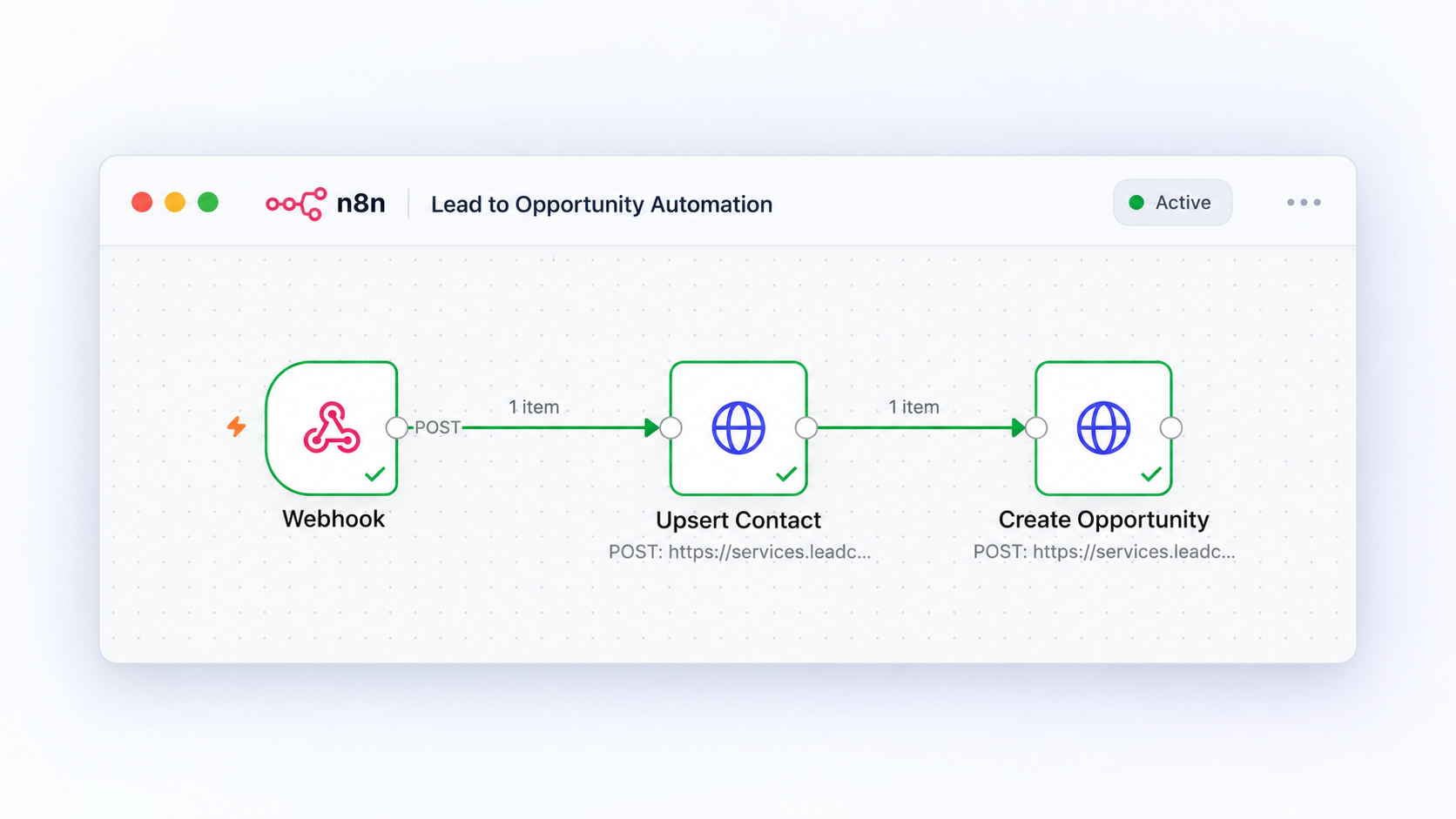
Each step has one clear responsibility.
The website sends the inquiry to n8n
When the form is submitted, its data is sent to a dedicated production webhook.
n8n passes the contact data to HighLevel
The workflow uses HighLevel’s contact endpoint to create a new contact or update the existing record when the person is already known.
The project information is stored with the contact
The workflow maps the form answers into dedicated custom fields for the current process, bottleneck, tools being used and desired improvement.
The inquiry is tagged with its source
The contact receives the relevant source information and project inquiry tag so it remains clear where the lead entered the system.
An opportunity is created automatically
n8n creates an open opportunity in the Smart Systems Desk Project Inquiry pipeline and places it in the initial New Inquiry stage.
A small stack, with each tool doing a specific job.
WordPress + Kadence
Provides the public project inquiry page and form.
n8n
Receives the form submission and controls the automation logic between the website and CRM.
HighLevel
Stores the contact, project information and opportunity inside the CRM and pipeline.
The inquiry becomes actionable as soon as it enters the system.
No manual transfer of contact details from the website into the CRM.
Important project context is stored with the contact instead of remaining only inside a form submission.
Every project inquiry enters the same structured pipeline.
The system creates a consistent starting point for follow-up and future workflow automation.
Automation is most useful when it removes the handoff between tools.
The value of this workflow is not simply that a form is connected to a CRM.
The useful part is that the information collected at the first point of contact continues through the process without having to be entered again.
That makes the intake process easier to manage and provides a structured foundation for later follow-up, qualification and additional automation.
The same principle applies to many business processes.
Lead intake
Website inquiries can automatically become structured CRM records.
Client onboarding
New client information can trigger the correct internal workflow and next steps.
Quote requests
Request information can be routed to the right person, pipeline or process automatically.
Service requests
Incoming requests can be categorized, stored and routed without manual data entry.
Let’s look at what can be connected or automated.
Tell us how your process works now, where it gets stuck and what you would like to improve.