Building an AI Efficiency Scan Workflow
How an AI-powered business scan was connected to Supabase, n8n and HighLevel so that useful scan results become structured CRM data and can trigger relevant follow-up automatically.
Turning scan results into useful business data.
The AI Efficiency Scan helps a business identify where time is being lost, where processes are still manual and where automation or AI could create the most useful improvement.
But producing a useful result is only part of the process. The information also needs to be stored, connected to the right contact and made available for relevant follow-up.
The goal was therefore to connect the scan itself with the systems behind Smart Systems Desk without creating extra manual work.
A personalised result is much more useful when the data does not stop at the result page.
The scan produces more than a simple contact form submission. It creates an AI Efficiency Score, identifies the most relevant opportunities and recommends a practical first step.
Those results are useful both to the person completing the scan and to Smart Systems Desk when deciding what type of follow-up would actually be relevant.
Without a connected workflow, the scan result and the CRM would remain separate systems. Useful information would either have to be transferred manually or would never reach the CRM at all.
The scan could generate valuable insights, but those insights needed to move automatically from the application into the CRM in a structured and usable form.
The scan turns business answers into a clear result and recommended first step.

The result needed to move through the system without losing context.
Store the scan data
Keep the submission, answers and calculated result in a structured database.
Send the result to n8n
Pass the relevant contact and scan information into the automation layer.
Update the CRM
Create or update the HighLevel contact and store the important scan results.
Start relevant follow-up
Tag the contact so HighLevel can begin the appropriate follow-up workflow.
Four connected layers turn the scan into an automated workflow.
The scan application collects the user’s business information and calculates the AI Efficiency Score, recommended first step and top opportunities.
Supabase stores the underlying submission and result data. Once the result is available, the relevant information is sent to a production webhook in n8n.
n8n then connects the application to HighLevel. It creates or updates the contact, stores the important scan information in dedicated CRM fields and applies the AI Efficiency Scan tag.
That tag can then be used inside HighLevel to trigger the follow-up workflow without requiring the scan data to be handled manually.
Each system handles the part it is best suited for.
The user completes the AI Efficiency Scan
The scan collects practical information about the business, its workflows, current tools and areas where work is still inefficient or repetitive.
The result is calculated and stored
The application generates the AI Efficiency Score, recommended first step and top opportunities while Supabase stores the submission and supporting data.
n8n receives the relevant result data
A production webhook receives the contact details, audit ID, score, recommended first step and top opportunities.
The HighLevel contact is created or updated
n8n passes the information into HighLevel and stores the scan result in dedicated custom fields attached to the contact.
The contact is tagged for follow-up
The contact receives the AI Efficiency Scan tag and source information, providing a clear trigger for the HighLevel follow-up workflow.
The CRM workflow can continue from the information already collected.
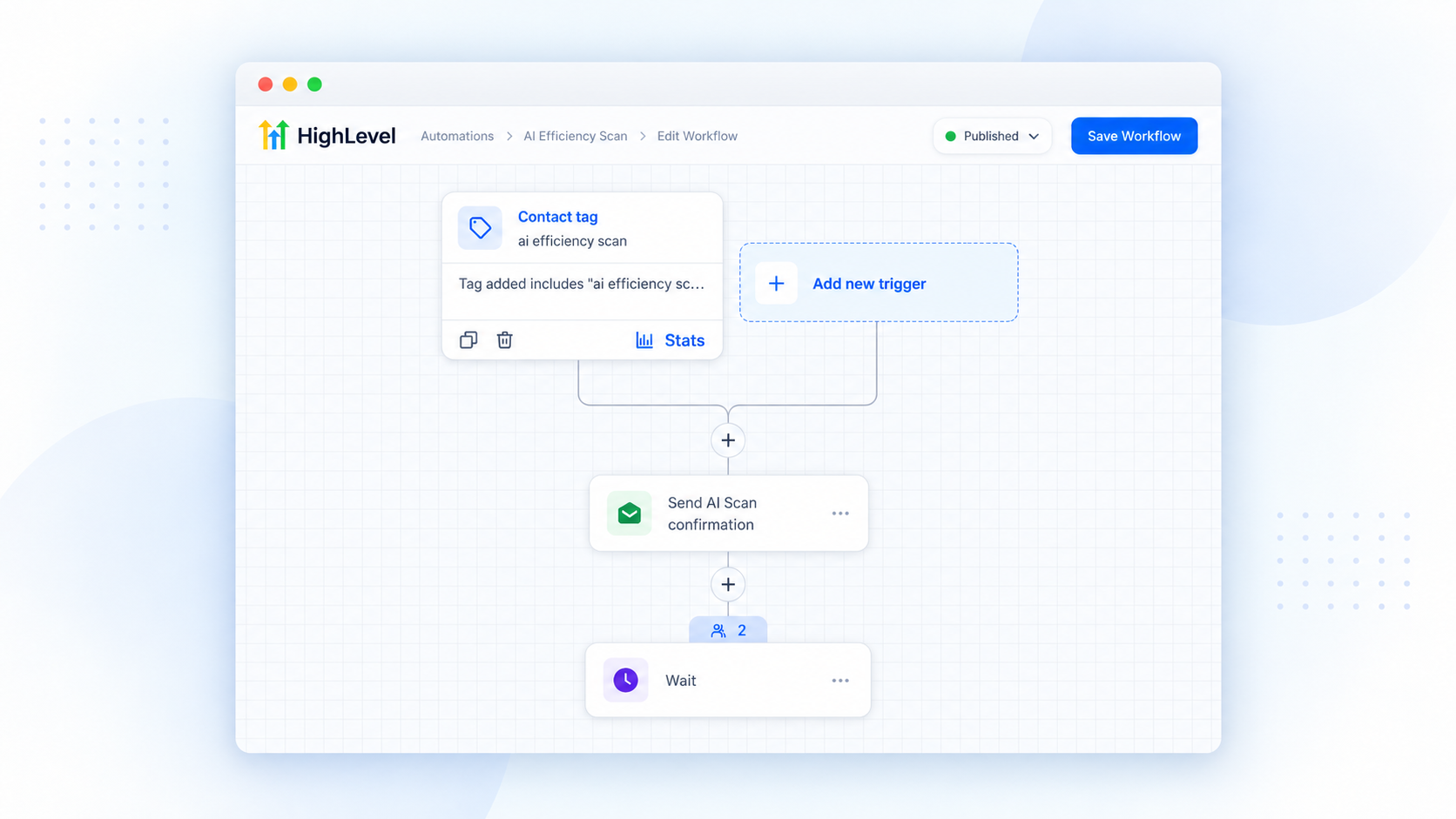
The contact record contains more than a name and email address.
Audit ID
Keeps the CRM contact connected to the corresponding scan submission.
AI Efficiency Score
Stores the overall scan score as structured CRM data.
Recommended first step
Records the most useful starting point identified by the scan.
Top opportunities
Keeps the most relevant improvement areas available for future follow-up.
A connected stack with a clear role for each system.
Lovable
Provides the user-facing AI Efficiency Scan application and result experience.
Supabase
Stores scan submissions, workflow answers and calculated result data.
n8n
Moves the relevant scan data between the application and HighLevel.
HighLevel
Stores the CRM contact, scan fields, source information and follow-up workflow.
The scan becomes part of the business workflow instead of an isolated tool.
Scan results are stored automatically instead of being copied manually.
The CRM receives useful context about the contact and their scan result.
The scan source remains identifiable through tagging and source information.
HighLevel can continue the follow-up process from structured data already collected.
Useful AI output becomes more valuable when it connects to the next business action.
An assessment can provide a useful answer, but its business value increases when the result can continue into the systems already used for contact management and follow-up.
In this workflow, the user receives a personalised result while the business receives structured information that can be used immediately.
The same principle can be applied to many AI-powered assessments, calculators, audits and lead qualification tools.
The same architecture works for more than an efficiency scan.
Business assessments
Turn questionnaire results into structured CRM data and next steps.
Lead qualification
Use answers and scores to create more relevant follow-up.
AI audits
Connect personalised recommendations directly to the wider client workflow.
Interactive calculators
Store useful results and make them available to sales or service teams.
Let’s connect it to the rest of your workflow.
Tell us where your process starts, which systems are involved and what should happen automatically next.